Saturday, September 14, 2019

WEEK 7 FYP2

WEEK 7

DATE: 5/9/2019
SUPERVISOR: SIR SHAH RIZAILLI BIN MUKHTAR
👉 CONSTRUCT CIRCUIT

Activities


Figure 1: Filtering Circuit


  • After doing the first testing, it is observed that the sound sensor can detect sound even from a longer distance. So, I decide to do the filter for the sound by constructing bandpass filter circuit. The function of filtering circuit also to get a smooth waveform signal as it appeared on the oscilloscope. 
  • Frequency range between 3kHz to 5kHz based on testing using syringe pump.
  • So, resistor and capacitor used are:
  • R1= 2.4Kohm C1= 22nF
  • R2= 1.4Kohm C2= 22nF
  • Op amp LM741 is used in order to construct this circuit. 
  • However, I did not test this circuit on syringe pump yet.


WEEK 6 FYP2

WEEK 6

DATE: 28/8/2019-30/8/2019
SUPERVISOR: SIR SHAH RIZAILLI BIN MUKHTAR
👉 CONSTRUCT CIRCUIT

Activities

Figure 1:Connection sound sensor and Arduino Uno with oscilloscope 

Figure 2: Setting up oscilloscope
  • I continue doing my project at FYP laboratory as I will be using oscilloscope to measure the frequency of sound wave and its voltage. The testing is done by doing the humming sound from different distance from the sound sensor and plucking finger to see the accuracy and also the sensitivity of the sound sensor.
Humming sound:
1) 1st try: 

Frequency: 229.9Hz at 30cm distance from sound sensor

2) 2nd try
Frequency: 213.0Hz at 10cm distance from sound sensor

3)3rd try
Frequency: 238.1Hz at 5cm distance from sound sensor


👉 CONNECT WIFI USING WEMOS 

  • I would like to check the functionality of Wemos Wifi module.
  • Firstly, connect the module to the laptop by using USB cable.
  • Then, write the coding to connect to wifi as shown in the figure below.


  • Then, compile the coding and run the program.
  • Lastly, click on the serial monitor symbol to see the result. Serial monitor will show that the wifi is already connected to the phone.


👉 CONNECT WEMOS WITH TELEGRAM.
  •  I try to connect the module to telegram by testing using led. When LED is ON, telegram bot will receive notification displaying LED is ON and vice versa.
  • Connect LED to the module and by using USB cable, connect the module to laptop.

  • The coding will be like this.


  • Then, compile the coding and run the program. The problem occur when there is no notification appear on telegram when the LED is ON or OFF. 

  • I have check the coding but there is no problem with the coding. So, I google to find the answer. It shows that I need to downgrade the version of ArduinoJson as the latest version is not compatible to be used to connect to the telegram. Then, the program works.


WEEK 5 FYP2

WEEK 5

DATE: 19/8/2019-22/8/2019
SUPERVISOR: SIR SHAH RIZAILLI BIN MUKHTAR


👉 INSTALLATION OF ARDUINO IDE VERSION 1.8.8

  • If we are using the Arduino IDE software for the first time, the screen will appear like the figure below. 
  • There are also some library that need to be installed so that the programmed can be compile and run. The library include ArduinoJson, ESP8266 and also TelegramBot. For example, if we are using Blynk apps, then we need to install Blynk library. The library can be installed through board manager in the software. If fail to include one of these library, the programmed cannot be compile and will not work.


👉 TEST COMPATIBILITY OF SOUND SENSOR WITH ARDUINO UNO

Activities

Figure 1: Connection of Arduino Uno and Sound sensor


  • I have construct the circuit by connecting Arduino Uno with sound sensor module. An LED is used to show the detection of sound by the sound sensor. The LED will blink if the sound sensor detect the sound. For example, I try plucking finger near the sound sensor and the LED blink. At some moment, it also detect sound when people speaks. So, the sensitivity of the sound sensor must be fixed.

👉 MEETING WITH SUPERVISOR
  • The purpose of this meeting is to update my progress to Mr Shah Rizailli and also discussing on the signal conditioning circuit that suitable to be used for this project.
  • Supervisor also told me on how to do the data collection and to get more data as possible.

Friday, August 23, 2019

WEEK 4 FYP2

WEEK 4

DATE: 14/8/2019
SUPERVISOR: SIR SHAH RIZAILLI BIN MUKHTAR
👉 COMPONENT

Activities
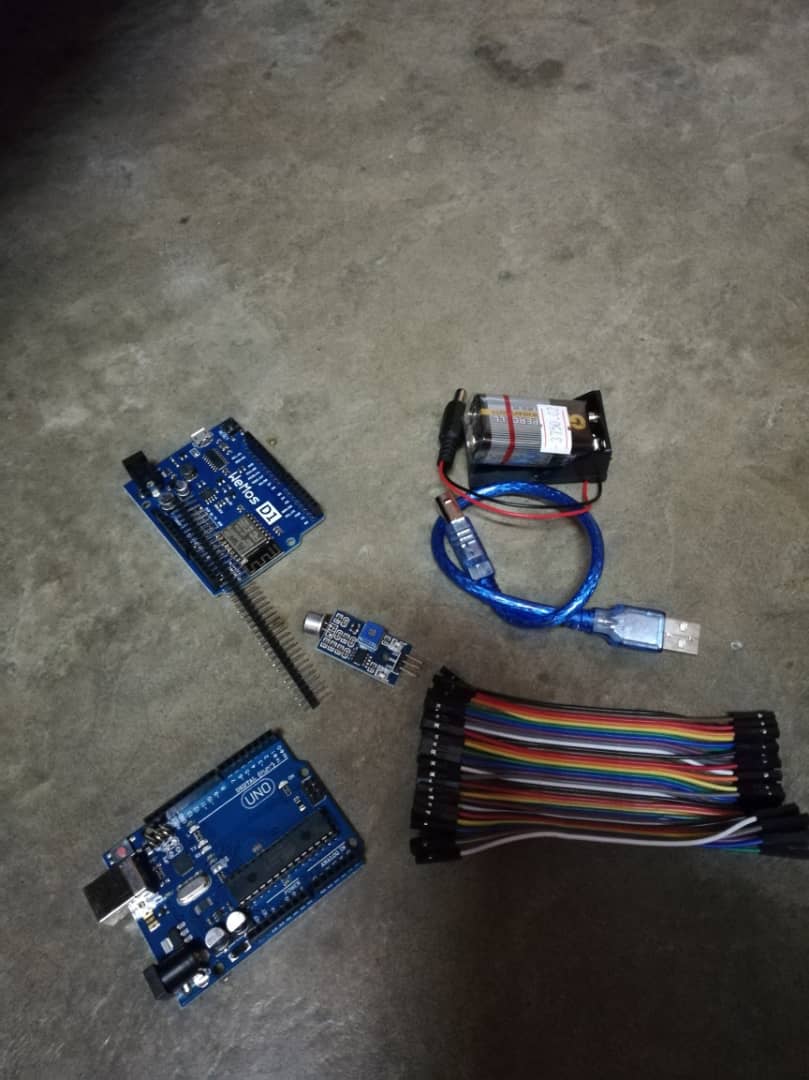
  • I had bought all the component needed to do the testing at Autobotic Sdn Bhd, Setapak. It is easier buying the component here as I can do online ordering and when all the component is ready, I just go to the shop picking up the component.
  • COMPONENT
    QUANTITY
    PRICE
    Arduino Uno
    1
    RM23.50
    WEMOS D1 WiFi Module
    1
    RM26.50
    Sound Sensor FC-04
    1
    RM4.60
    9V battery
    1
    RM2.50
All the component is in a good condition.

Sunday, August 18, 2019

WEEK 3 FYP2

WEEK 3

DATE: 8/8/2019
SUPERVISOR: SIR SHAH RIZAILLI BIN MUKHTAR
👉  Meeting With Supervisor

Activities
  • The students were introduced to one of the representative from the industry who is expert in biomedical engineering to present our FYP2 project ideas to him.
  • During the meeting, we shared ideas and information on how the project works and also discussed on how to develop the prototype.
  • It is good to be able to share the ideas and knowledge with the engineer as he has many experience in the industry and told us the improvement that can be made with our project.
  • After the meeting, I discussed with the supervisor the progress in developing the prototype. The next step is to contact the Radibems at Level 3, asking them whether I can use the medical equipment in their office. This is because I need a sample of medical equipment that is faulty with a different brand to compare the result of the sound produced. 

DATE: 9/8/2019
SUPERVISOR: SIR SHAH RIZAILLI BIN MUKHTAR
👉  Study previous FYP project

Activities
  • I did the study and read on the previous related project done by the senior. Their project is basically about the detection of faulty alarm from medical equipment but they are using different type of signal conditioning circuit, different types of faulty alarm and also different medical equipment. The way of sending the notification to the end user also is different. 
  • By studying previous project, I get the ideas on how to improve the product in term of its accuracy, design and also data collection.
  • My focus also is on the circuit construction, method used to capture the alarm sound and analyze the frequency signal. 

WEEK 2 FYP2

WEEK 2

DATE: 31/7/2019
SUPERVISOR: SIR SHAH RIZAILLI BIN MUKHTAR
👉  1st FYP2 Briefing

Activities

Speaker: Dr Imran Mohd Sofi

  • The first FYP2 briefing is about the planning and activities of FYP2 for the whole semester. 
  • Progress Report
    20%
    FYP Exhibition Day
    35%
    Final Report
    35%
    Technical Paper
    10%
                     FYP2 Assessments
  • Important dates: 


DATE: 29/7/2019
SUPERVISOR: SIR SHAH RIZAILLI BIN MUKHTAR
👉  SEARCH RELATED ARTICLES/ VIDEOS

Activities

  • Read articles on the types and frequency of infusion pump alarms: Protocol for a Retrospective Data Analysis. The objectives of the study is to analyze baseline data related to the types and frequency of infusion pump alarms from the B. Braun Outlook 400ES Safety Infusion System with the accompanying DoseTrac Infusion Management Software. This study will analyze the  overall infusion pump alarm frequency (number of alarms per active infusion), duration of alarms (average, range, median), and type and frequency of alarms distributed by care area.

Links


WEEK 1 FYP2

WEEK 1

DATE: 19/7/2019
SUPERVISOR: SIR SHAH RIZAILLI BIN MUKHTAR
👉  SURVEY COMPONENT PRICE

Activities
  • I did the survey on the price of the component needed for my FYP2 Project. 
  • I have been comparing the price of the component between Shopee, Lazada and Autobotic Sdn Bhd.
  • Autobotic Sdn Bhd
    Shopee
    Lazada
    Arduino UNO R3 Compatible
    RM 23.50
    RM 25.50
    RM 22.50
    Arduino WeMos WiFi Module
    RM 26.50
    RM 25.90
    RM 25.90
    Battery 9V
    RM 2.50
    RM 5.50
    RM 6.90
    Battery Holder
    RM 2.90
    RM 1.30
    RM 1.30
    Jumper female to female
    RM 2.80
    RM 3.00
    RM 3.70

👉  PLANNING FOR THE WHOLE SEMESTER


Week 1
Do the survey of the component price
Week 2
i)                1st FYP2 briefing
ii)              Search related articles/videos

Week 3
i)                Meeting with Supervisor
ii)               ii) Study previous FYP project that related to the topic

Week 4
Buy component
Week 5
i)                Testing component such as sound sensor/arduino uno
ii)              Meeting with supervisor

Week 6
Construct circuit and testing
Week 7
i)                Construct filtering circuit and testing
ii)              Meeting with supervisor

Week 8
Testing on medical equipment
Week 9
Construct hardware
Week 10
Preparation for exhibition day
Week 11
i)                Meeting with supervisor
ii)              Exhibition Day

Week 12
Getting ideas for improvement of prototype
Week 13
i)                Data collection using LabView
ii)              Meeting with supervisor

Week 14
Doing improvement of product
Week 15
Report writing
Week 16
Report writing
Week 17
Submission of Report


Thursday, May 30, 2019

WEEK 16

WEEK 16

DATE: 27/5/2019
SUPERVISOR: SIR SHAH RIZAILLI BIN MUKHTAR
👉  PROPOSAL REPORT WRITING 

Activities
  • Completing the full report for Final Year Project 1 from Chapter 1 to Chapter 6.
  • Send the full proposal report to supervisor via email to check the contents of my report and to check for plagiarism.
  • My supervisor will inform if there any corrections or improvement to be done through email.
  • The hard copy will be send only if supervisor satisfied with the report proposal.